
Business and accounting software for nonprofits
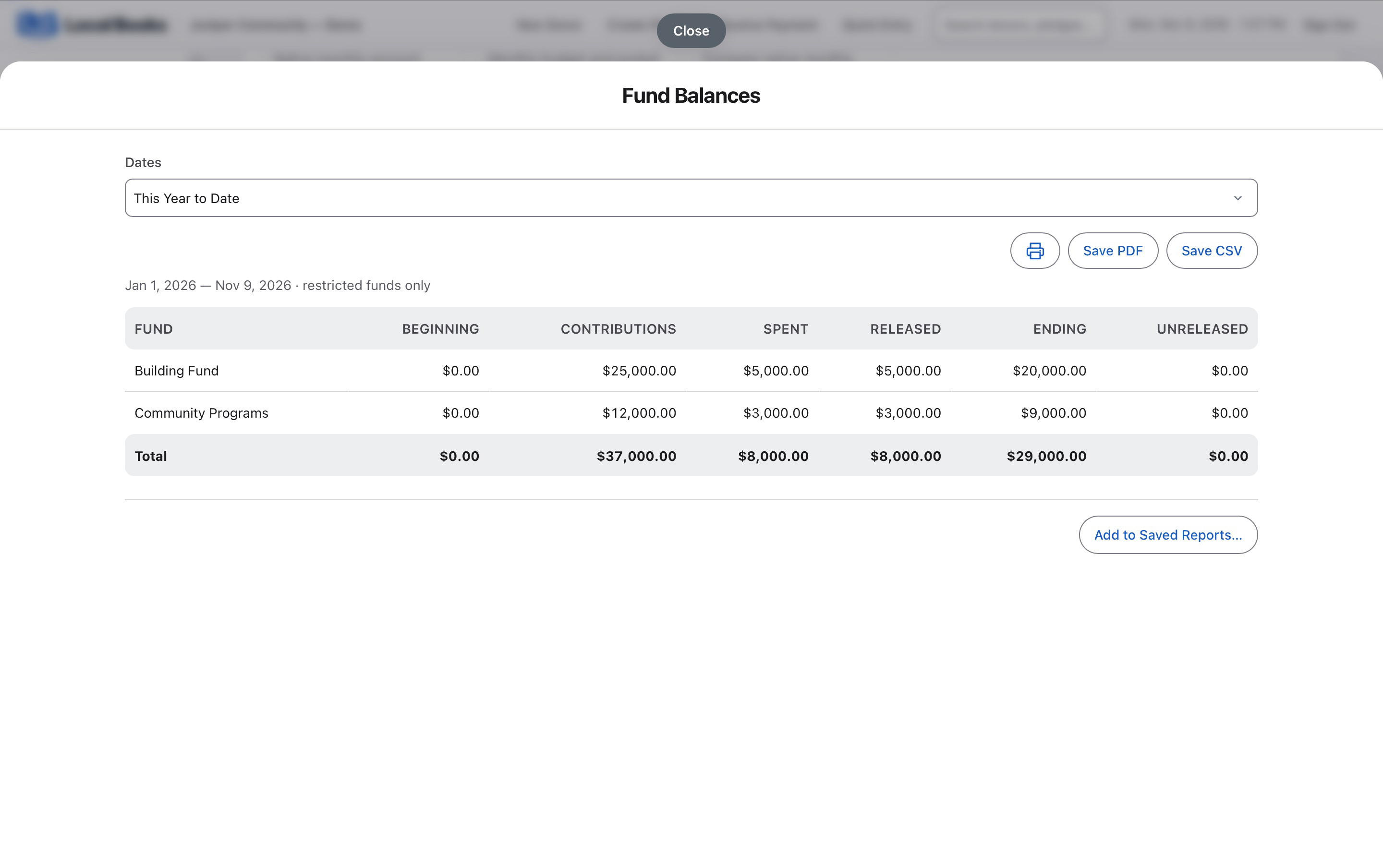
Show how contributions were used, what remains in each fund and which gifts have only been pledged. Local Books keeps donor records, fund activity and everyday accounting together so staff can prepare for the next board meeting from the same books.
Follow gifts, spending and the balances you report
Keep gifts, pledges and fund activity distinct
Record contributions and review outstanding pledges separately. Track grant activity and applicable restrictions in the appropriate fund so its use stays visible.
Explore donor, grant and fund toolsSee where program money went
Record program purchases and use functional allocations for shared costs where applicable. Review releases when funds with restrictions are used.
Prepare reports the board can review together
Review the Fund Balance Report with the Statement of Activities and Statement of Financial Position. Prepare donor giving statements from recorded contributions.
Explore accounting reportsExample workflow
A community nonprofit receives a grant for after-school supplies
Keep funds and donor records organized
Record gifts and keep pledges visible until received. Record the grant and applicable restrictions using the appropriate fund. Keep documents that show the permitted use with your accounting records.
Review program spending and shared costs
Record eligible supply purchases and review restrictions and releases when the funds are used. Use functional allocations to distinguish program costs and supporting activities where applicable.
Prepare a board report package
Review the Fund Balance Report alongside the Statement of Activities and Statement of Financial Position. Use donor giving statements for recorded contributions and review outstanding pledges separately.
How does the office manage day-to-day work?
Record vendor bills, bank reconciliation and employee payroll in the same books. Confirm reporting and filing needs with your accountant before relying on a particular statement for an external requirement.
Own your software and work in books you control
Run your business with either edition
One purchase includes a perpetual license and 12 months of eligible updates. Keep using your version and choose when to buy an optional upgrade. Both editions include the core accounting, sales, purchasing, inventory, job and payroll tools, with no per-user software fees.
Share the same company records
Desktop supports up to five office computers, including the Mac or Windows host. Server has no fixed workstation or concurrent-user limit and supports secure access across locations with the appropriate network setup. It also offers the employee portal when enabled. Staff sign in with their own permissions.
Bring the records you need
Review supported imports or start with reconciled opening balances. Your company files stay on the computer or server you manage.